Quick answer
Pick the maximum size shown by the form, choose that KB or MB target, process the image once, then check the verified final size before uploading it elsewhere. If the first result looks too soft, raise the target if the form allows it or reduce dimensions only as much as needed.
- Use the form limit as the maximum, not a magic exact byte count.
- Keep the original file in case you need to try again.
- Use a target-size page such as 500 KB or 1 MB when the requirement matches one of those common limits.
Walkthrough: use the actual image compressor controls
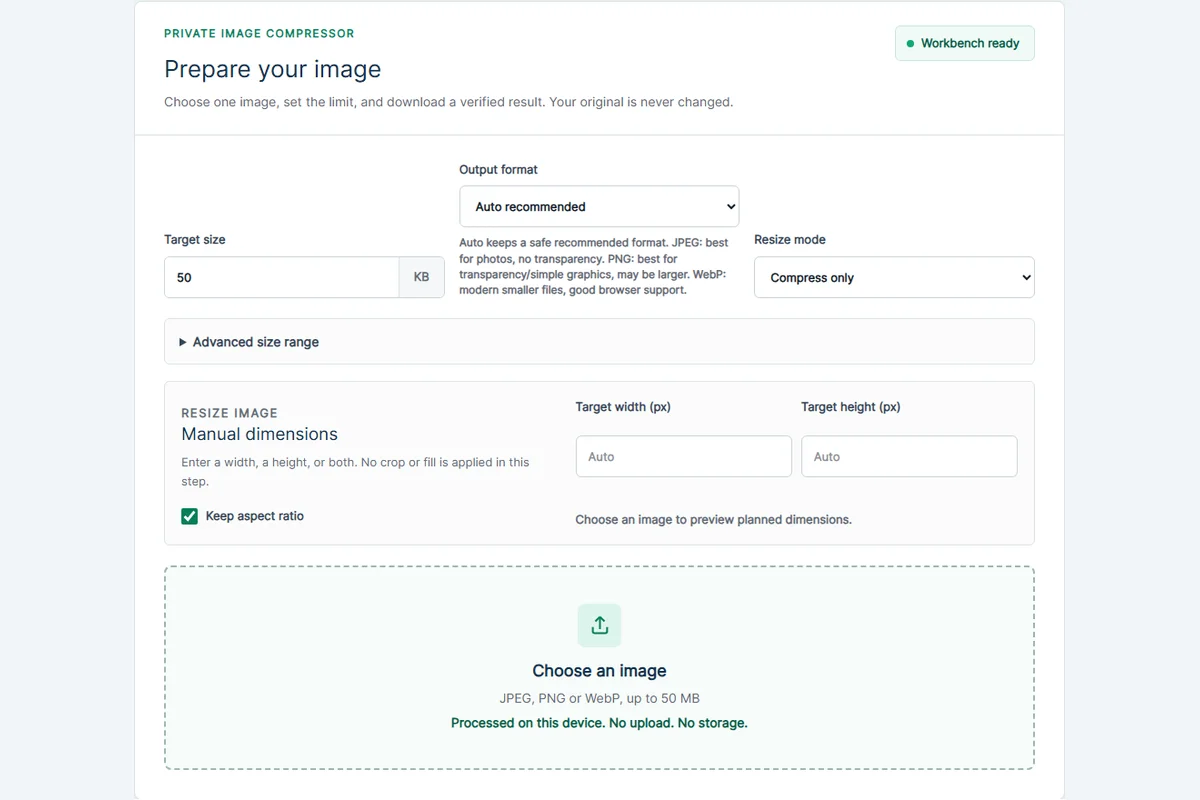
Open the image compressor or a preset page for the maximum your form allows. In Target size, enter the required limit in KB; for example, enter 500 for a 500 KB maximum. Preset pages prefill this field, and you can edit it.
Choose Output format: Auto recommended, JPEG, PNG or WebP. For a photo, JPEG may make a smaller file; if you need transparency, avoid JPEG and use PNG or WebP if the destination accepts it.
Leave Resize mode on Compress only when your form does not specify image dimensions. If you also need fewer pixels, select Resize and compress and enter a Target width or Target height in pixels. Keep aspect ratio selected to avoid accidental stretching.
Choose one JPEG, PNG or WebP image (the picker accepts files up to 50 MB), review the original size and planned output, then select the processing button. After the tool finishes, check the result size, dimensions, format and Target status before choosing Download verified image.
- Only use Resize only if the destination requires new dimensions but not a KB limit; that mode does not enforce the Target size field.
- Advanced size range is optional. Use its minimum only if a portal specifies both a minimum and a maximum.
- Re-check the saved result before submitting it to the outside website; CompressImageTo does not submit files on your behalf.
Worked example: a portal accepts images no larger than 500 KB
Suppose a form says the photo must be JPEG and below 500 KB. Open the compressor, set Target size to 500 KB, select JPEG as the Output format, keep Compress only, and choose the original photo. Process once and look for a verified result below your limit. Download it and inspect its readability before uploading to the form.
If the same form also requires a particular width, use Resize and compress and enter the required width with Keep aspect ratio selected when permitted. The dimensions requirement and file-size requirement are separate, so verify both in the resulting file.
Troubleshooting with the on-page warnings
If processing cannot produce a verified file, it reports an error instead of supplying an unverified download. Try a less restrictive target when the destination permits, or reduce dimensions with Resize and compress if the upload does not require the original resolution.
A transparent logo may lose transparency if you explicitly choose JPEG. For a transparent source use PNG or WebP where the destination allows it. If Advanced size range says the output is below the requested minimum, the tool does not add fake padding to make it larger.
If Resize only appears to ignore the KB limit, that is intentional: it changes dimensions without enforcing a target size. Switch back to Compress only or Resize and compress for file-size limits.
Start with the upload limit
Most portals mean a maximum file size, not an exact byte count. If a form says the image must be 100 KB or less, the safer target is slightly below 100 KB so rounding differences do not cause a rejection.
CompressImageTo target-size pages prefill common limits, but the custom box is useful when your form uses a different number.
- Choose KB for small portal limits.
- Choose MB for larger image uploads.
- Use the exact number from the form, then verify the result before uploading elsewhere.
Use resize only when quality cannot fit
A good compression workflow tries format and quality first. If the file still cannot fit under the target, reducing dimensions can help because fewer pixels usually need fewer bytes.
Do not stretch an image to force a file size. If you resize, keep the aspect ratio unless you intentionally need exact dimensions and accept possible distortion.
Check the final result
Do not trust a file until the final download has been measured. CompressImageTo verifies the output size before showing success, and it labels impossible targets honestly instead of adding fake padding or claiming a false pass.
Common mistakes
The most common mistake is recompressing the same file repeatedly in different tools until it looks worse than necessary. Work from the original when possible, make one careful output, then review that output.
Another mistake is changing dimensions when the form only asked for file size. Resize can help, but it also removes detail. If the file can pass by compression alone, that is usually the cleaner first attempt.
- Do not chase an exact byte count unless the portal explicitly demands it.
- Do not add fake metadata or padding to make a file larger.
- Do not assume a smaller file is automatically better if the image becomes unreadable.
Quick answers
Is exact size the same as under a maximum?
Usually no. Most upload forms want the image below a maximum size. A verified file slightly under the limit is safer than aiming for an exact byte count.
Why might a target be impossible?
Very small limits can require too much quality loss or dimension reduction, especially for detailed photos or transparent graphics.
Related tools
Compress image
Set a custom KB or MB target.
Compress image to 500 KB
Useful for forms and document images.
Compress image to 1 MB
Use a common larger image limit.
Keep learning
How to compress an image without uploading it
No-upload compression means your selected image is handled on your device for the tool workflow instead of being sent to a server for processing.
Image file size guide for uploads
Image file size depends on dimensions, format, compression settings and image detail. The same 1200 x 800 image can be small or huge depending on what it contains.
JPEG vs PNG vs WebP
JPEG, PNG and WebP solve different problems. The best format depends on whether you need small photo files, transparency, sharp graphics or broad upload compatibility.